Boomerang Casino Mobile App
There is no download, and that is not a shortcoming — it is how every offshore casino reaches an Irish phone. The mobile site installs to your home screen in about ten seconds and runs identically. Here is the setup, the errors you will hit, and what happens to a spin when the connection drops.
The Short Answer
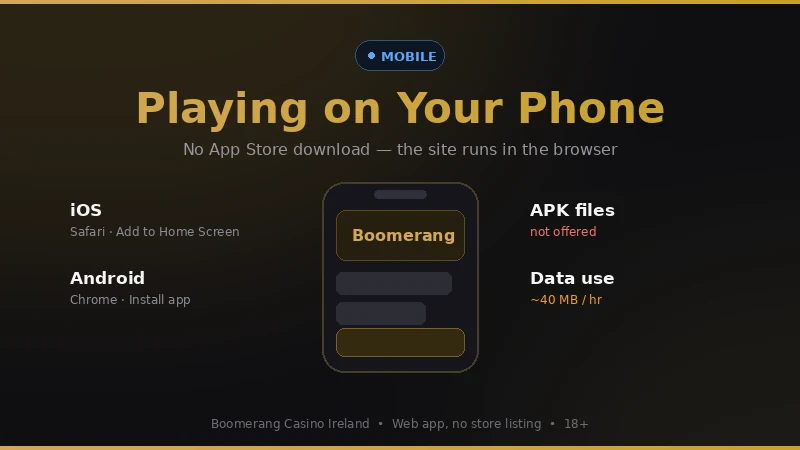
No native app, no App Store listing, no APK. Open the site in Safari or Chrome and add it to your home screen — it then launches full-screen with your session intact and every game, the cashier and document upload all work.
Checked 2 September 2026. Page rendered .
Status: Is It Actually Down?
No platform-wide outage recorded at the last check
Last editorial check: 2 September 2026. This page does not poll the casino in real time, and any site that claims to is guessing — a monitor outside the operator cannot see your session, your bank, or your ISP.
Practically every "Boomerang is down" report we have traced back was one of four local causes rather than the platform: a DNS resolver holding a stale record, an ad blocker breaking the game iframe, a browser refusing a third-party cookie, or a mobile network's own filtering. The diagnostic below separates those in about a minute.
Recurring issues log
Game iframe blank, page otherwise fine
Content blockers treat game provider domains as trackers. Whitelist the site or disable the blocker for it. Most common single report.
Site unreachable on mobile data, fine on Wi-Fi
Some Irish mobile plans apply content filtering by default, especially on accounts set up with an age filter. Ask the operator to lift the adult content filter on the account.
Login loop after a browser update
Safari's storage clearing and Chrome's third-party cookie changes both do this. Installing to the home screen fixes it permanently.
Account genuinely closed rather than broken
A closed or self-excluded account produces a login failure that looks like a technical fault. If credentials are right and reset does not help, that is what happened.
Installing It on Your Phone
iPhone and iPad
- Open the site in Safari. It has to be Safari — Chrome on iOS cannot install to the home screen.
- Tap the share icon at the bottom of the screen.
- Scroll to Add to Home Screen and tap it.
- Name it and tap Add. The icon appears with your other apps.
Launching from the icon gives you a full-screen window with no address bar, and the session survives between sessions properly.
Android
- Open the site in Chrome.
- Tap the three-dot menu, top right.
- Choose Install app, or Add to Home screen on older builds.
- Confirm. Chrome may offer it on its own after a couple of visits.
Samsung Internet, Firefox and Edge all support the same thing under slightly different menu names.
Do not sideload an APK
There is no official Boomerang APK for Ireland. Files circulating under that name are repackaged by third parties, and an installed Android package can read notifications, overlay other apps and log what you type. If a site offers you one, that alone tells you what the site is.
The 60-Second Diagnostic
In order. Stop at the first one that changes anything.
1. Switch Wi-Fi off, use mobile data
If it works now, it is your home router's DNS or a filter on the broadband line. If it stops working, it is your mobile plan's content filter.
2. Open a private window
Loads fine there? An extension or stale cookie is the problem. Clear site data for the domain only, not the whole browser.
3. Turn the ad blocker off for this site
Game iframes come from provider domains that blockers routinely eat. This is the top cause of "the games will not load".
4. Try a second browser
Works in one, not the other, and it is a browser setting. Fails in both and it is the network or the account.
5. Try a different device on the same network
Isolates the phone from the connection in one step.
6. Reset the password
If the reset email never arrives at an address you know is right, the account itself is restricted rather than the site being down.
Fix By Symptom
| What you see | Most likely cause | Fix |
|---|---|---|
| Page loads, games are blank rectangles | Content blocker | Whitelist the domain, reload |
| Logged out every time you return | Browser clearing storage | Install to home screen |
| Deposit screen spins forever | 3-D Secure push missed | Open the banking app first, retry |
| Nothing loads on mobile data only | Network content filter | Ask the operator to lift the adult filter |
| Live tables stutter, slots fine | Bandwidth | Wi-Fi, or drop the stream quality |
| Correct password refused | Account restricted | Contact support through live chat |
Error Codes Worth Recognising
403
Access refused for your location or network. A VPN causes this more often than it solves it — playing behind one breaches the terms and can void a balance.
502 / 504
Genuine server-side trouble, usually brief. Wait ten minutes rather than retrying a deposit repeatedly.
Game unavailable
A provider licence issue for your country, not a fault. The title will not come back by reloading.
Session expired
Idle timeout, typically 15 to 30 minutes. Log back in; nothing is lost.
Transaction declined
Your bank, not the casino. Start with the gambling block — see the payments page.
Verification required
You have crossed the pre-KYC deposit ceiling. Upload documents and it clears within 48 hours.
What Happens to Your Bet When It Crashes
Slots settle server-side. The outcome of a spin is decided and recorded before your phone draws the reels, so a connection dropping mid-animation does not change the result — reload and the balance is already correct. A spin that never reached the server was never charged.
The awkward case is a charged spin whose result you never saw. Before you contact anyone, open the game and find its own round history: every certified slot keeps one, with round IDs and outcomes. Screenshot the round in question. Support will ask for exactly that, and having it turns a week of back-and-forth into a single message.
Live dealer games are different because the round is physical. A dropped connection during a live blackjack hand means the hand plays on without you, usually standing your cards automatically. That is in the game rules, not a bug, and it is a good reason not to play live tables on a marginal connection.
When the Phone Is the Wrong Device
On a capped data plan
Live dealer streams run to 300 MB to 1 GB an hour. Slots are fine; live tables are not, on a limited plan.
On a shared or family phone
A home-screen icon and a saved session are visible to whoever picks it up. Use a browser tab, or do not install it.
If a home-screen icon is a trigger
One tap and no friction is the point of installing it. If you are trying to cut down, that is precisely the wrong thing to build.
On a work device
Managed devices log installed web apps, and a gambling icon on a company phone is a conversation you do not need.
Mobile App FAQ
Is there a Boomerang Casino app for iPhone or Android?
Not in the App Store or on Google Play. Apple and Google both require a licence from the regulator of the country the app is distributed in, and no online casino holds an Irish gaming licence yet. What you get instead is the mobile site, which you can install to the home screen and which behaves like an app once it is there.
How do I add Boomerang Casino to my home screen?
On iPhone: open the site in Safari, tap the share icon, choose Add to Home Screen. On Android: open it in Chrome, tap the three-dot menu, choose Install app or Add to Home screen. It takes about ten seconds and the icon behaves like any other app afterwards.
Should I download a Boomerang Casino APK?
No. Boomerang does not publish an APK for Ireland, so any file offered under that name comes from a third party and could contain anything. Sideloading a gambling APK is one of the more reliable ways to hand someone your banking credentials. Use the browser.
Why does the site keep logging me out on mobile?
Usually Safari or Chrome clearing site data, or private browsing mode, or an ad blocker stripping the session cookie. Install to the home screen instead of using a browser tab and the session persists properly.
Can I deposit and withdraw from the phone?
Yes, and Revolut Pay is easier on mobile than on desktop because the approval happens in the app you are already holding rather than through a redirect.
What happens to my bet if the game crashes mid-spin?
A completed spin is settled on the game server before your screen updates, so the result stands and the balance corrects itself when you reload. A spin that never reached the server is not charged. The gap that causes arguments is a spin that was charged but not displayed — reload first, and check the game history in the game itself before contacting support.
How much data does an hour of play use?
Around 30 to 50 MB an hour on slots. Live dealer tables stream video and run closer to 300 MB to 1 GB an hour, which will make a dent in a capped Irish mobile plan.
Is the mobile site the same as the desktop one?
Same account, same balance, same games with a handful of older titles missing because they were never rebuilt for touch. The cashier and verification upload both work on mobile.
Payment methods
Why a mobile deposit fails.
Withdrawal times
Requesting a payout from the phone.
About this site
How these checks are done.
Install It From the Browser, Not From a File
Ten seconds, no download, and none of the risk that comes with a sideloaded package. 18+ only. Set a deposit limit while you are in the settings anyway.